
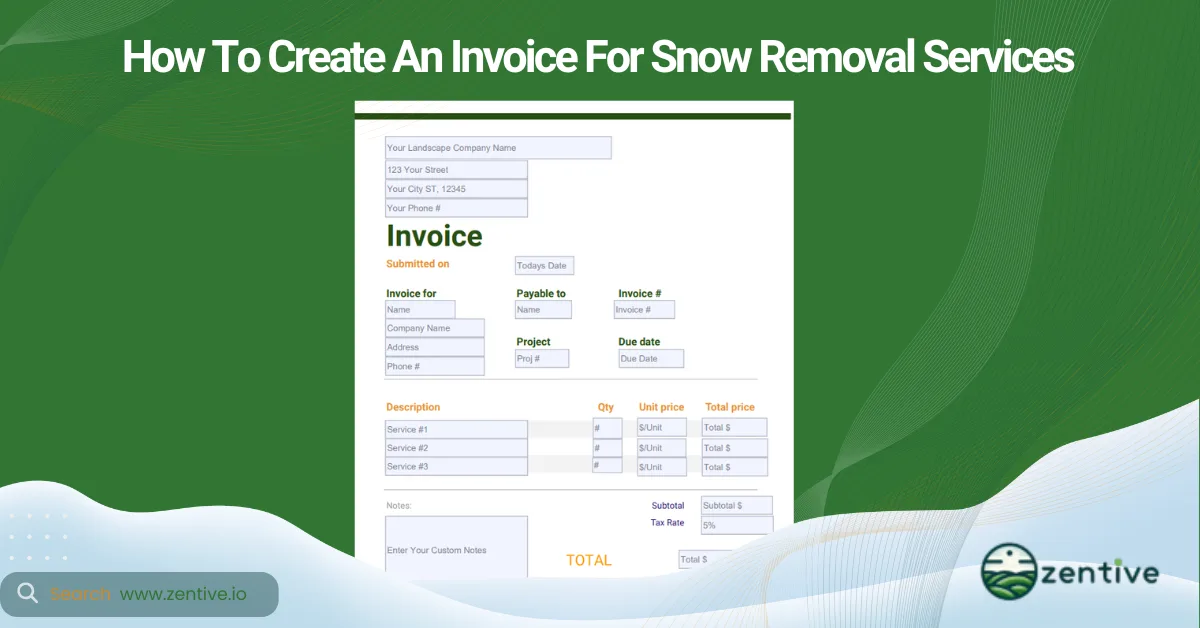
A snow removal invoice is a business document that lists the job details and payment terms of a service your business provides to a client. A snow plow invoice is very important as it acts as a formal document for the collection of payment from clients. You can use invoices as a reference in case of legal disputes.
However, creating a snow removal invoice comes with its challenges. Many snow removal businesses would agree that the main challenge is managing multiple client accounts and tracking their payments after the invoice has been sent.
Follow the below six steps when creating a snow removal invoice.
- Compile Job Details: Gather all relevant information about the snow removal job.
- Select Billing Software: Choose a platform to create and manage the snow invoice.
- Generate the Invoice: Create an itemized bill with snow services, costs, and totals.
- Review the Invoice: Double-check for accuracy before sending it to the client.
- Send the Invoice: Deliver the invoice via email, mail, or preferred client method.
- Follow Up: Ensure timely payment by contacting the client if needed.
Following these six steps will ensure your invoices look more professional. After all, you have a brand image to maintain, and sending invoices to clients - commercial or residential - should always look professional. You can download our snow removal invoice template to help you create even more professional invoices. It will save you time when creating invoices.
Snow removal invoicing software can help you save time when creating invoices. Not only that, but this type of tool solves the main invoicing challenge I mentioned earlier. Snow removal invoicing software can automatically track payments and, using CRM features, can even send automated follow-ups if the client hasn’t yet paid. But more on that later, let’s first go through the invoice creation steps.
1. Compile Job Details
Compile the snow removal job details to ensure full scope is captured on the invoice. Start with the client’s details, including full name, address, and contact information. Next, outline the service details. Describe each service you provided and the specific dates to keep the record clear.
Additionally, include relevant expenses (subcontracted services, materials, etc.) That’s why you must keep detailed expense records. Lastly, double-check that your snow removal quote and invoice match details, including costs and services rendered.
2. Select Billing Software
Select billing software to efficiently create and manage the snow removal invoice. A snow removal invoicing software creates the invoice for you with all the needed information (job details, client information, and payment terms).
Why would you want to use an invoicing software? Invoicing software saves time, reduces errors, and automates follow-ups. Zentive, for instance, works as an invoice generator, helping you create professional, accurate invoices in a fraction of the time it would normally take. It includes a downloadable snow removal invoice template, which is printable and easy to fill in, making it ideal for generating quick, professional invoices.
3. Generate The Invoice
Generate the invoice with itemized snow removal services, associated costs, and payment terms. When you generate the invoice, include key information, including client details, services with dates, itemized costs, and payment terms. Either the business owner or office manager handles this step, but it’s important that someone double-checks your work.
4. Review Your Invoice
Review the invoice for accuracy by checking client information, service details, and totals. Proofread your invoice thoroughly. You review an invoice by checking for typos or missing details. You should even double-check that you didn’t write an invoice for the wrong Jacob. Trust me, errors like this happen quite a lot when you have clients with the same name.
The main goal of reviewing your invoices before sending them is to maintain your business’s professional image.
5. Send The Invoice
Send the invoice using the client’s preferred delivery method, such as email or mail. Sending your invoice can be done in two ways: using software or manually (mailing). Sending an invoice can be done in seconds if you’re using software. It can even send them in bulk if you’re handling multiple clients.
However, mailing either through email or letter is an option for those who prefer traditional methods. Either way, quick and organized invoicing reflects well on your business.
6. Customer Follow-Up
Follow up on the invoice to ensure timely payment and resolve any outstanding balances. An invoice follow-up is a professional and gentle reminder that you have not yet received payment. This can be done 7-10 days post-invoice.
You might feel uncomfortable sending a follow-up, but you have a business to run, and you worked hard for that money, so you deserve to receive it! Still, snow removal management software can help you overcome that uncomfortable feeling. This software automates the follow-up process by tracking payments and sending a follow-up to your clients. It works for both types of snow plow clients.
How To Invoice Different Types of Snow Plow Clients?
There are two main types of snow plow clients - residential and commercial clients - and each requires a different invoicing approach. Residential clients are homeowners who require occasional driveway snow removal or sidewalk blowing, so invoices should focus on each specific job.
In comparison, commercial clients, like businesses with parking lots, often require ongoing services like parking lot plowing and de-icing, so they are billed periodically. Organizing your invoices by service period is key for commercial clients as it keeps things manageable and creates a consistent billing cycle.

How To Invoice Residential Snow Removal Clients?
Residential clients are homeowners who seek snow removal services. When creating your residential invoices, follow the same steps as described in the article. Make sure the follow-up period is fairly short (7-10 days), and create an invoice for each service call.
How To Invoice Commercial Snow Removal Clients?
Commercial clients are businesses that seek snow removal services for parking lots and business areas. Follow the steps described in the article when you create your invoice. However, the main difference is that your invoices should be either monthly or by service period.
How To Invoice Different Types of Snow Plow Services?
You should invoice different types of snow plow services by considering each as a unique service in terms of costs associated and profit margins. Snow plow services include basic driveway clearing, de-icing, blowing, parking lot plowing and salting, and more. For example, residential services might include single driveways or sidewalks. At the same time, commercial contracts involve large lots or entrances with ongoing maintenance.
The type of service affects invoicing; one-time services like a residential driveway clearing often have single invoices, while recurring services like a commercial parking lot contract require monthly or seasonal billing.
Keeping track of the unique invoicing needs of each type of invoice can be difficult. Luckily, snow removal software can help you organize invoices based on service type and frequency.
Why Use Software To Send Snow Plow Invoices?
You should use invoicing software to send snow plow invoices, as this software offers tools that make invoices more professional and accurate. Snow removal software provides tools for managing recurring invoices, sending reminders, and integrating with payment platforms, saving time and reducing management errors.
Some snow removal software, like Zentive, even offers integrations with apps for job scheduling and payment tracking, so all your billing needs can stay in one place without manual input.
Does Snow Plow Invoicing Software Integrate with Crew Routing?
Yes, most invoicing software for snow removal integrates with route optimization tools. Snow plow route optimization apps determine the best paths for snow removal crews, saving time and fuel. This integration means your billing process syncs with your team’s actual routes, making it easier to invoice based on completed routes or distances, especially for larger commercial jobs.
Does Snow Plow Invoicing Software Integrate with Job Scheduling?
Yes, snow plow invoicing software integrates with job scheduling software. Job scheduling software helps assign and track snow removal jobs. The integration between these two tools is useful for recurring services and larger accounts. It allows you to schedule services in advance and automatically create invoices once jobs are complete. It’s a simple way to keep track of multiple jobs and bill clients accurately.
Does Snow Plow Invoicing Software Integrate with QuickBooks?
Yes, snow plow invoicing software integrates with QuickBooks. Quickbooks is one of the most popular accounting tools. It manages finances, tracking income, expenses, and taxes. This integration simplifies your record-keeping, keeping everything centralized, accurate, and up-to-date.
What Should Be Included on a Snow Plow Invoice?
There are 16 key elements of a snow plow invoice.
- Company’s name, address, and contact info: All the company details that help with identification.
- Client’s details: Include name, address, and contact information.
- Invoice number: Unique ID for easy tracking, e.g., Inv 001 or Inv J12.
- Invoice date: When the invoice was issued.
- Service description: Outline the services you provided.
- Labor hours and rates: Specific hours your crew worked and hourly rates.
- Subtotal of services/materials: Total before taxes.
- Applicable taxes: Any necessary local or state taxes.
- Total amount due: The final amount the client owes.
- Payment terms and due date: Clear deadline and terms.
- Payment methods accepted: Options like card, cash, or bank transfer.
- Late payment policy: Possible fees or interest on late payments.
- Warranty or guarantee info: Any coverage on services.
- Special notes/instructions: Additional client info.
- Company logo (if applicable): A logo is a professional branding touch.
- Signature line: Space for authorization to certify the invoice.
What Are Tips for Snow Plow Invoicing?
Tips for snow plowing invoices include sending the correct type of invoice, using automated follow-ups, including taxes, specifying payment terms, including a receipt, and creating better quotes.
First, send the correct type of invoice based on the job - whether it’s a one-time service or a recurring contract. Automated follow-ups help remind clients about unpaid balances without the manual effort. Don’t forget to include taxes if required by your state. Always specify payment terms upfront to avoid confusion, and consider providing a receipt for every payment as a professional courtesy.
Creating better quotes - ones that are more professional, easier to follow, and don’t have errors - improves your brand image and makes the invoicing process easier.
| Tip | Description |
|---|---|
| Send the Correct Invoice Type | Ensure the invoice matches the job type, whether it’s a one-time service or a recurring contract. |
| Use Automated Follow-Ups | Set up reminders for unpaid balances to save time and improve collection rates. |
| Include Taxes | Ensure compliance by including applicable taxes as required by your state. |
| Specify Payment Terms | Clearly define payment deadlines and accepted methods to avoid confusion. |
| Provide Receipts | Offer a receipt for every payment as a professional courtesy and for record-keeping. |
| Create Better Quotes | Develop professional, error-free quotes that are easy to understand, enhancing your brand image. |
What Are the Types of Snow Plow Invoices?
There are four types of snow plow invoices: standard, recurring, prepayment, and time and materials invoices.
You use a standard invoice for single, one-time services. Recurring invoices are better for regular maintenance clients. You send a prepayment invoice before the service begins, often for high-cost projects. Lastly, the time and materials invoice itemizes labor and materials and applies to larger jobs or contracts.
Why Use Automated Snow Plow Follow-Ups?
You should use automated follow-ups to make it easier to remind clients that they still need to make their payments. Automated snow plow follow-ups improve cash flow by reminding clients of unpaid invoices without needing manual intervention. This keeps your income steady and minimizes the risk of late payments.
Do All Invoices for Snow Plowing Include Tax?
No, not all snow plowing invoices include tax. Tax on snow removal services depends on your state’s tax laws. Some states may charge sales tax, while others may not. Be sure to check local tax regulations so you only charge taxes when required.
How Long Do Snow Plow Clients Get to Pay Invoices?
Businesses usually grant snow plow clients Net 15, Net 30, or Net 60, where clients have 15, 30, or 60 days, respectively, to pay from the invoice date. Net 15 is ideal for smaller jobs, while Net 30 or Net 60 are typical for larger, recurring commercial contracts.
Should Snow Plow Companies Provide Invoice Receipts?
Yes, snow plow companies should provide receipts as it is a good business practice. A receipt reassures clients that their payment was received and adds a professional touch. Many invoicing software offers a printable receipt template you can use. Zentive offers a free receipt template you can use to create your receipts.
How Can Better Quotes Improve Snow Plowing Invoices?
Better quotes can improve your snow plowing invoices by setting clear expectations from the start, which helps prevent misunderstandings when invoicing. A well-detailed quote covers labor, materials, and any other charges, so clients know what to expect. Many businesses even use a snow removal pricing formula to ensure their quotes are more accurate and prevent disputes when clients receive their invoices.
Get This Guide as a PDF
Save this article for offline reading. We'll send a formatted PDF straight to your inbox.
No spam. Unsubscribe anytime.
Ready To Streamline Your Field Service Business?
Zentive is the all-in-one field service management software built for landscaping, lawn care, tree care, and snow removal businesses. Start your free trial today.
No credit card required · Cancel anytime