
01
HVAC scheduling & dispatch
Keep the day moving when plans change.
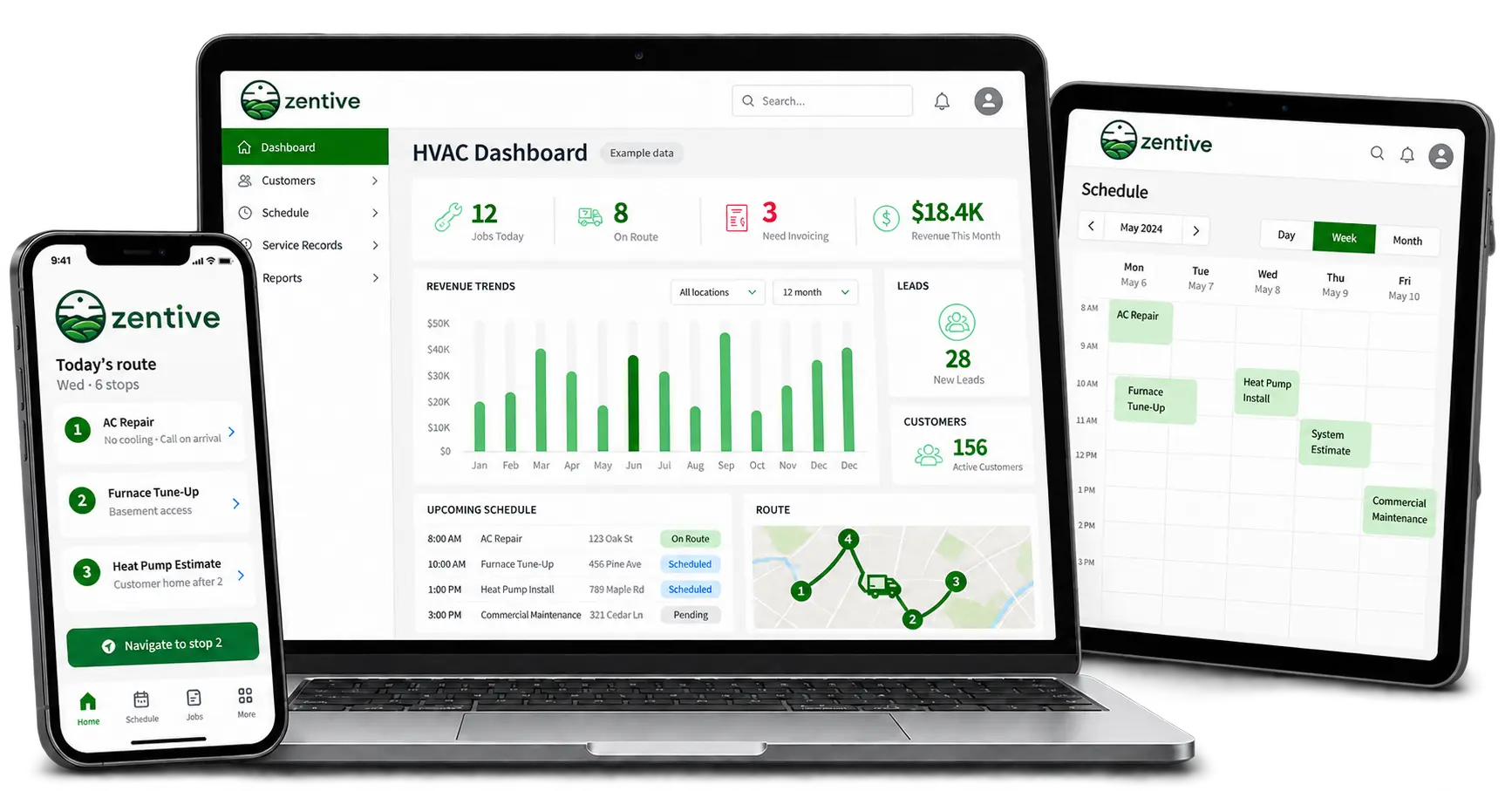
Assign service calls, installations and return visits on one calendar. Update the schedule when an urgent repair comes in, plan routes and see technician GPS from the office.
Limited time offer: save up to 30%
FOR HVAC BUSINESSES WITH 1–25 TECHNICIANS
Schedule service calls. Send estimates. Get paid.
Keep your HVAC business moving with Zentive.
Prefer a walkthrough? Book a demo
Fits the tools
you already use.
 QuickBooks Online
 Stripe
 Google Maps
 Mailchimp
 SERVICE CALLS TODAY. MAINTENANCE TOMORROW.
A no-cooling call needs attention now. A seasonal tune-up needs a place on the calendar. Keep repairs, installs and recurring maintenance connected without juggling separate systems.
One customer. A plan for the year.
Scope, access notes and photos
Scheduled with the right job notes
Customer history stays with the job
LESS CHASING. MORE DOING.
CRM, lead tracking, estimates, work orders, dispatch and billing. One cloud-based system for the office and the field.
HVAC scheduling & dispatch
Assign service calls, installations and return visits on one calendar. Update the schedule when an urgent repair comes in, plan routes and see technician GPS from the office.
HVAC estimates & proposals
Build quotes from your products and services, with labor, materials, overhead and profit in view. Send a clear repair or replacement estimate, then turn approved work into a job.
Work orders & mobile app
Share the work order, address, access instructions and previous job notes. Technicians can view the schedule, add photos and record their time from the field.
HVAC CRM & lead tracking
Keep contacts, properties, service history and open quotes together. Follow up on new inquiries and replacement estimates without losing the thread between office and field.
HVAC invoicing & QuickBooks
Create invoices, collect online payments and track unpaid balances. QuickBooks Online sync on eligible plans connects customer and billing records with your accounting.
Job costing & reporting
Review labor, materials and overhead alongside revenue. Use job-cost and business reports on eligible plans to spot work that needs a better price or a closer look.
A BETTER DAY FOR THE WHOLE TEAM
See the business beyond today’s schedule.
Arrive with the details already in hand.
Keep the next step clear.
SMS and email reminders are one-way. Customers reply by phone or email.
START SMALL. MAKE ROOM TO GROW.
Try Zentive free for 14 days. No credit card required.
Starter
1 user$51/month
$612/year, billed annually.
For the owner-operator.
Standard
Up to 5 users$95/month
$1140/year, billed annually.
For a growing team.
Growth Pro
Up to 15 users$175/month
$2100/year, billed annually.
For a larger operation.
All prices in USD. See the full feature breakdown for plan availability. More than 15 users? Talk to us.
MAKE AN INFORMED CHOICE
The best HVAC software for your small business fits your team, your billing and your reporting needs. Compare what is included—not just the starting price.
| Software | Entry price & basis | What to check |
|---|---|---|
| Zentive | $51/moStarter · 1 user · billed annually | Standard adds up to 5 users at $95/mo annually, including QuickBooks Online sync. Check the feature breakdown for your team. |
| Jobber | $29/moCore · 1 user · billed annually | QuickBooks Online sync and automatic payments are listed on Connect, from $99/mo for 1 user annually. |
| Workiz | Request pricingConfirm a package for your team | Evaluate its phone system and HVAC Price Book Pro alongside the scheduling, billing and accounting tools you need. |
| ServiceTitan | Request pricingPer-technician pricing | Compare the package and add-ons for your operation. Advanced reporting and customizable memberships vary by package. |
Sources: linked vendor pages, checked October 9, 2026. These entry plans are not feature-equivalent. Billing terms, routes, user limits, modules and fees differ. Confirm a quote for your exact needs.
IS ZENTIVE THE RIGHT FIT?
Choose Zentive when your priority is keeping recurring work, customers, quotes, routes and payments together—with pricing for a small service business.
Zentive manages the business workflow. For load calculations, system sizing, CAD, duct design or diagnostic tools, use dedicated HVAC engineering software alongside it.
BRING YOUR BUSINESS WITH YOU
Moving from Jobber, Workiz, ServiceTitan or spreadsheets? Start with your customer list, then build the workflow around your team.
Import your customer list by CSV.
Choose the service, property and visit frequency.
Assign technicians and review the route. Guided onboarding is available.
General Zentive walkthrough · Loads when you choose to watch.
LET’S WALK THROUGH YOUR WORKDAY
Bring a real workflow: a repair estimate, a maintenance agreement or a full day of service calls. We’ll walk through it together.
Free, 30-minute demo with the Zentive team.
Choose a time Pick an available slot directly in our calendar.THE BASICS, WITHOUT THE JARGON
HVAC business software helps heating and cooling contractors manage leads, customer records, estimates, work orders, schedules, technician dispatch, invoices and payments in one system.
Cloud-based, web-based software keeps the office and field team connected to the same job information. Instead of moving details between a spreadsheet, a paper work order and an invoice, your team works from a shared customer and job record.
It is also called HVAC field service management software. Compare maintenance agreements, mobile access, job costing and accounting integrations against your everyday workflow. Specialized inventory, installed-equipment and engineering requirements need a separate fit check.
GOOD QUESTIONS. CLEAR ANSWERS.
Estimates, service agreements, accounting and the details that matter.
Ask us about your workflow →Start with scheduling, dispatch, estimates, work orders, customer records, invoicing and online payments. Add recurring maintenance, mobile access, job costing and QuickBooks Online sync as your workflow requires. Check which plan includes each feature.
Yes. Assign jobs to technicians, adjust the schedule and share the job details with the field. Routing and GPS help the office coordinate the day. An urgent call still needs your team to decide who should attend and when.
Yes. Build quotes from your products and services, set the scope and price, and turn approved work into scheduled jobs. Include labor, materials and other costs so your team and customer can see what is included.
You can set your own service prices and use them in quotes and invoices. Zentive is not being offered here as a preloaded HVAC flat-rate pricebook or live supplier-pricing catalog. Bring your own pricing, and check any catalog requirements during a demo.
Yes. Set up recurring service visits for maintenance work, keep customer and property details together, and manage billing for the account. Review any requirements for membership discounts, included repairs or complex contract terms during your demo.
Yes, on eligible plans. Zentive supports QuickBooks Online synchronization for customer and billing records. It helps connect operations with accounting; it does not replace your accounting software or bookkeeping process.
Yes. Technicians can access assigned jobs, schedules, customer notes and photos, and record work from the field. The app supports offline access and later syncing. Test your team’s required workflow during the free trial.
Yes. Send invoices, accept online payments and use autopay for recurring accounts. Review your plan and payment setup for the billing workflow you need. Payment-processing fees are separate from the software subscription.
Yes. Manage residential customers and commercial accounts, including multiple service properties. Keep the work scope and service history with the customer. Discuss complex project billing and site-specific requirements during a demo.
This page focuses on service-business operations. You can use products and services in quotes and invoices and retain job notes and photos. If you need truck-stock replenishment, purchasing, serial-number tracking or warranty workflows, confirm those requirements with the team before choosing a plan.
No. Zentive is business-management software, not an HVAC load-calculation, system-sizing, CAD, duct-design or troubleshooting tool. Use specialized engineering software for those tasks.
Yes. Zentive supports a customer portal, appointment and payment reminders, and review requests. SMS reminders are one-way; this is not a two-way SMS inbox. Customers can contact your team by phone or email.
Zentive offers a 14-day free trial with no credit card required, rather than a permanent free plan. The free estimate and invoice tools linked below can be used without a subscription. Paid plans start at $51 per month equivalent, billed annually.
Starter includes 1 user, Standard up to 5, and Growth Pro up to 15. You can import a customer list by CSV, and guided onboarding is available. Ask about historical invoices, attachments and service agreements before planning a migration.
USEFUL BEFORE YOUR FIRST LOGIN
Start with the paperwork. Then bring the whole workflow together in Zentive.
Itemize labor, equipment and materials. Download a clear PDF estimate.
Create a HVAC estimate →FREE INVOICE GENERATORCreate a professional HVAC invoice with your service details.
Create a HVAC invoice →FREE WORK ORDER TEMPLATEGive your technician a clear record of the job and instructions.
Create a work order →MAKE ROOM FOR THE BUSINESS YOU WANT
Try Zentive with your team, your customers and your workflow.
Plans from $51/month, billed annually.