Limited time offer: save up to 30%

AI RECEPTIONIST

Missed calls become booked jobs. Nobody touches the phone.

When you can't pick up, your AI receptionist answers, texts the caller a booking link, and the job lands on your Zentive calendar. No callbacks, no voicemail, no lost work.

Works with your existing business number · Starting at $95/mo, billed annually

  • Answers calls 24/7, even when you're on a job
  • Texts customers a link to book real openings themselves
  • Booked jobs land on your calendar automatically
  • You approve anything that needs a closer look
Caller books in under 2 minutes. Zero calls back.

HEAR IT FOR YOURSELF

Listen to Sona take a call.

Hear how Sona sends booking links, takes quote requests and handles questions that need follow-up.

Recorded demo call0:49

EXAMPLE 01

Sends a booking link

Sona asks permission to text, collects the caller’s name and sends the link. The customer finishes booking on the webpage.

Read transcript

Sona: Hi there. This is Sona, a virtual assistant. This call is being recorded for quality and training. How can I help today?

Caller: Hi, I have a leaking outdoor faucet and I’d like to schedule a repair.

Sona: This is a test booking flow. May I text a booking link to this number?

Caller: Yes.

Sona: What is your first and last name?

Caller: Alex Anderson.

Sona: Thanks, Alex. I’ll text the booking link to this number now.

Caller: Perfect. Thank you. I’ll book through the link.

Sona: You’re welcome, Alex. The booking link was sent successfully. Is there anything else you’d like help with?

Caller: No, that’s it. Thank you.
Recorded demo call1:10

EXAMPLE 02

Takes a request for a quote

Sona collects the work details and callback preference without promising a price or an appointment.

Read transcript

Sona: Hi there. This is Sona, a virtual assistant. This call is being recorded for quality and training. How can I help today?

Caller: Hey, I’d like an estimate to replace a bathroom faucet and install a new kitchen sink in my house.

Sona: I understand. I’ll take a message about your faucet and kitchen sink estimate. May I have your first and last name?

Caller: Alex Anderson.

Sona: Thank you, Alex Anderson. What’s the best number to reach you at?

Caller: The number I’m calling you from.

Sona: Thank you. I have your callback number as the number you’re calling from. The message is about estimating a bathroom faucet replacement and new kitchen sink installation. Is there anything else you’d like to add?

Caller: Well, I haven’t bought the fixtures yet, so I’d like someone to discuss the options I have with me and give me a quote. I’d prefer if someone called me first so we can discuss the work.

Sona: Understood, Alex. I’ll note that you want options discussed before purchasing fixtures, followed by a quote. Is there anything else you’d like to add?

Caller: No, that’s it. Thank you.

Sona: You’re welcome, Alex. Someone will follow up as soon as possible. Have a great day.

Recorded demo call0:54

EXAMPLE 03

Handles an unanswered question

This test setup has no hours or service-area details, so Sona takes a message. Add those details in Sona so it can answer these questions.

Read transcript

Sona: Hi there. This is Sona, a virtual assistant. This call is being recorded for quality and training. How can I help today?

Caller: Hi, my name is Alex. I have a couple of questions before I book. What are your business hours?

Sona: I don’t have the business hours available. I’ll take a message about your hours inquiry. May I have your last name?

Caller: Anderson. I have another question. What areas do you service?

Sona: I’m taking a message about your hours and service-area questions. What’s the best number to reach you at?

Caller: You can reach me at the number I’m calling you from. And I’m actually just gathering information, so that’s all I need. Thank you.

Sona: Thanks, Alex Anderson. I’ve noted your questions about hours and service areas. Is there anything else you’d like to add?

Caller: No, that’s it. Thank you.

Sona: Thank you, Alex. Have a great day. Goodbye.

Your business details. Your answers. Fewer interruptions.Read moreRead less

In Sona inside your Quo account, add your business hours, service area, services and prepared answers to common questions. Sona uses that information to help callers, so your team spends less time answering the same questions over and over.

You control the information and can update it when things change. Our third recording shows the fallback when those details have not been added yet.

Less time on the phone. More time on the job.

A missed call is a lost job

Sona answers and texts a booking link before they call the next company.

Phone tag eats your day

Callers book routine visits themselves. You see a job on the calendar, not another round of phone tag.

You don't want strangers filling your calendar

You decide which jobs book instantly and which wait for your OK.

FROM CALL TO CALENDAR

How AI phone answering works with Zentive

One call starts it. Your customer takes the next steps on their phone.

  1. A customer calls

    Sona answers according to the call flow you set in Quo, including after hours.

  2. Sona texts them your booking link

    With permission, Sona sends a link to your Zentive booking page.

  3. They pick a real opening

    The caller chooses a service and a time that fits your booking rules.

  4. They confirm with a text code

    A code confirms their phone number before they finish booking.

  5. The job lands on your calendar

    You see the confirmed visit in Zentive. The customer gets a confirmation text.

Sona answers in Quo. The customer finishes booking through your Zentive link.

YOU CHOOSE WHAT GETS BOOKED

Instant booking for routine jobs. Your approval for the rest.

Keep easy-to-scope visits moving. Give bigger jobs the attention they need.

FOR WORK YOU KNOW

They choose the time. You get the job.

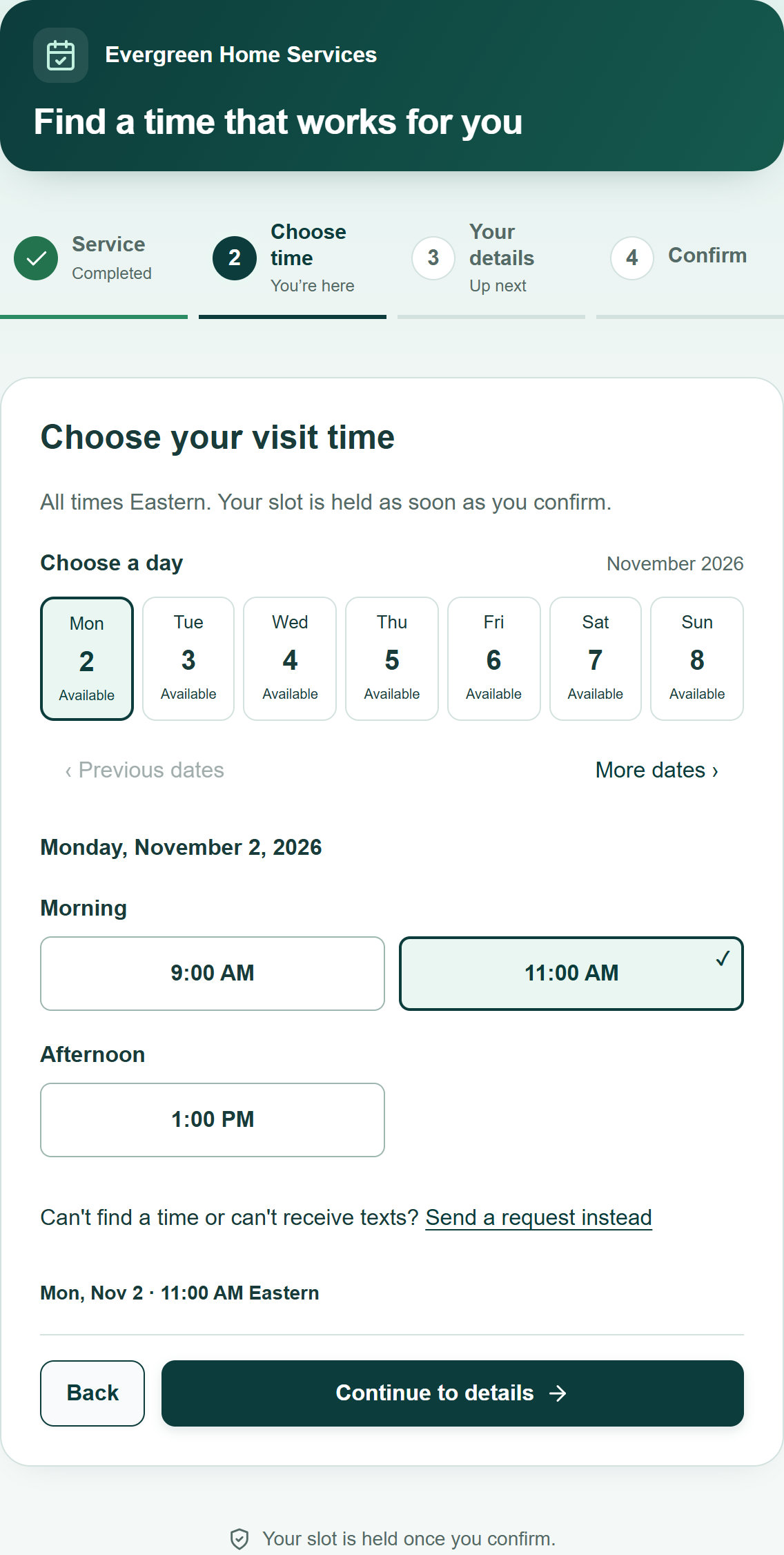
Offer real openings for services you have allowed to book instantly. The customer confirms their phone number with a text code and finishes booking.

  • Times follow your booking hours and crew availability.
  • Confirmed visits appear on your Zentive calendar.
  • Change which services book instantly any time in Settings.
Illustrative example

AUTOMATIC DOESN'T MEAN ANYTHING GOES

Guardrails that keep
your calendar yours

Make room for good work, with rules that fit your business. You decide who can book, when they can book and what needs your approval.

01 / VERIFY

A real phone number

Text codes confirm the caller's number. Bot checks and request limits help keep unwanted bookings out.

02 / SET LIMITS

Your hours and limits

Choose your booking hours, notice period, daily booking cap and service-area ZIPs.

03 / STAY IN CONTROL

Your final say

Keep complex work subject to approval. Choose whether automatic bookings require a recent inbound call.

Work that needs your approval becomes a request you review, not a booking. Suspected abuse can be blocked.

LESS PHONE TAG. CLEARER FOLLOW-UP.

Know who needs a callback

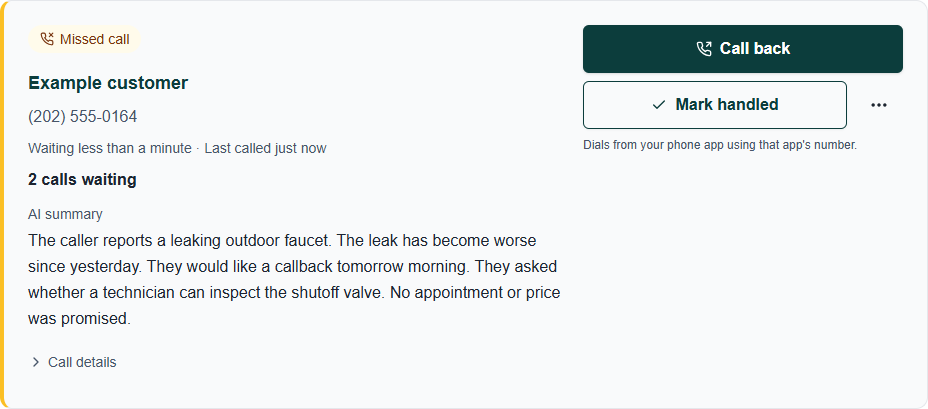
See missed calls, available AI summaries and who is still waiting. Return the call and mark it handled, all from the same list.

ZentiveMessage Center · Calls
Zentive callback card showing a caller summary, Call back and Mark handled actions
Illustrative example

Sona-handled calls can include a summary too. Summary availability depends on Quo and your call settings.

Call back opens your device's calling app. Your outgoing number depends on that app.

BUILT FOR THE TRADES

AI phone answering for landscapers, lawn care, HVAC and plumbers.

Same receptionist, tuned to the calls your industry actually gets.

01

Landscaping

“Can you give me a quote on a new patio and some plantings?”
See how it fits

Big projects need a look first. Set estimates to Ask me first so callers can send a request for your review.

Explore landscaping software
02

Lawn Care

“Do you have room for a weekly cut starting next month?”
See how it fits

Let callers book an initial visit during your available hours. Your team can agree on recurring service after reviewing the property.

Explore lawn care software
03

HVAC

“My AC died and it’s 95 out. Can someone come today?”
See how it fits

Sona can send a link to available visits or take a message for your team. Same-day availability depends on your schedule and notice rules.

Explore hvac software
04

Plumbing

“There’s water coming through my ceiling.”
See how it fits

Configure Sona to collect the address and explain your urgent-call process. Your team decides how quickly it can respond.

Explore plumbing software

View all industries

PLANS AND SETUP

Included on Standard and Growth Pro.

Pick a Zentive plan, connect your Quo number and set up Sona to answer your calls.

Prices below are per month

Starter

1 user

$51/mo

Billed annually ($612/year)

  • AI receptionist booking (Sona + booking link): not included
  • Instant booking + approval requests: not included
  • Confirmation text codes: not included
  • Daily booking limits and service-area ZIPs: not included
  • Call summaries and callback list: not included
Get Started with Starter

Growth Pro

Up to 15 users

$175/mo

Billed annually ($2100/year)

  • AI receptionist booking (Sona + booking link)
  • Instant booking + approval requests
  • Confirmation text codes
  • Daily booking limits and service-area ZIPs
  • Call summaries and callback list
Get Started with Growth Pro

During the free trial you can set everything up. Live booking texts turn on with an active eligible subscription.

See full plan details

What you need

02 · YOUR PHONE APP

A Quo account with Sona turned on.

Add your business details and common answers in Sona. Quo bills you separately.

03 · TEXT DELIVERY

One-time phone-carrier registration.

Register so your booking texts deliver. Carrier setup and ongoing messaging fees apply.

Read the setup guide ↗

Zentive does not resell Quo. You pay Quo for calls and texts, and Zentive for booking and follow-up.

A FEW THINGS TO KNOW

AI receptionist FAQs

Does Zentive answer the phone itself?

Sona in your Quo account answers the phone. Zentive handles the booking page, available times, text codes, scheduled jobs and follow-up. Connect your own Quo account and configure when Sona answers.

Does the customer book entirely by talking to the AI?

No. The customer finishes booking through a texted link. They select a service and time, enter their details, confirm their number with a text code and finish the booking. The final details stay in front of them.

Can a brand-new customer book?

Yes. They do not need an existing Zentive customer record. You can allow anyone with the link to book or require a recent inbound call from the same phone number. Your service, area and scheduling rules still apply.

Can it book work while I am asleep?

Yes, when Sona and automatic booking are turned on. Customers can finish booking jobs you have allowed to book instantly after hours. Your booking hours control when the visit takes place, and the customer gets a confirmation text right away.

What if I need to quote the job first?

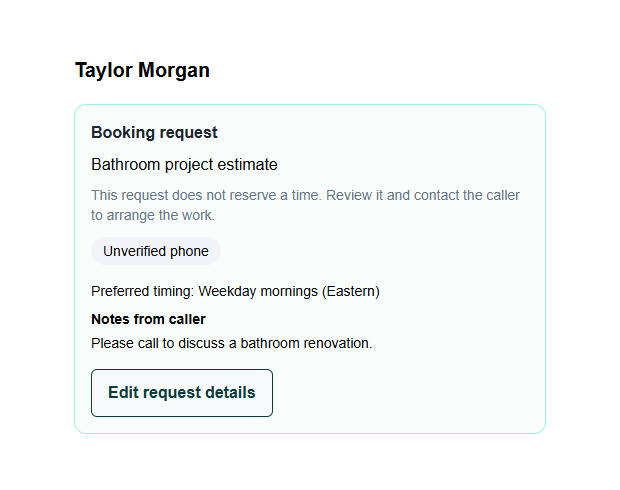
Set that service to Ask me first. The caller sends their details and preferred timing to Lead Management. The request does not reserve a slot; you follow up and schedule when you agree on the work.

How do you reduce spam bookings?

Text codes, bot checks and request limits help reduce unwanted bookings. You can require a recent inbound call and set a daily booking limit. Keep work that needs a closer look subject to your approval; no system can guarantee every inquiry is legitimate.

Which plans do I need, and what costs extra?

Automatic booking is included on active Zentive Standard and Growth Pro plans. Text codes are included. Your Quo subscription, Sona usage and phone-carrier charges are billed separately, and summary availability depends on your Quo plan and call settings.

What needs to be set up before it works?

Connect Quo, set your booking rules and add your link to Sona. In Sona, add your business details and prepared answers to common questions. Complete the one-time phone-carrier registration so your booking texts deliver, then test the link and finish the Go live checklist in Zentive.

What is an AI answering service for home service businesses?

It is a virtual receptionist that answers calls using your business instructions. Sona can answer questions, collect caller details and send a booking link. Zentive gives the caller a way to book approved services or send a request for your team.

Can I keep my existing phone number?

You can usually keep it by moving an eligible number to Quo. Check number-transfer eligibility with Quo before changing providers. Zentive connects to the business numbers in your Quo account.

How much does the AI receptionist cost?

You pay for your Zentive plan and your own Quo account. Zentive includes automatic booking on Standard and Growth Pro, with text codes included. Quo sets its own subscription, Sona usage and phone-carrier fees; check its current plans before subscribing.

Does it work for landscaping, lawn care, HVAC and plumbing?

Yes. Configure your services and Sona instructions for the work you do. Let predictable visits book instantly and keep quotes or complex jobs for review. Set your hours, service area and urgent-call process to suit your team.

What happens if two people call at once?

Quo handles incoming calls according to your configured call flow. Set the fallback for when your team is busy and check Sona capacity and usage with Quo. If two customers try to book the same opening, Zentive checks availability again before confirming so only one can take it.

KEEP YOUR HANDS ON THE WORK

Make your next missed call a booked job.

Give customers a way to book while you're busy. Keep the rules, the calendar and the final say.