

HVAC SEO is the work of making a heating and cooling company’s website and local listings show up for the searches its customers run. Google’s local-ranking guidance names 3 factors that decide local results: relevance, distance and prominence. The 7 steps are matching keyword intent, managing the Google Business Profile, building service and location pages, writing titles and headings, improving crawlability and speed, earning reviews and local mentions, and measuring leads. SEO takes months to show results. Agency support and paid ads cover the gap while the site improves.
What is HVAC SEO?
HVAC SEO is search-visibility improvement for the services and territory an HVAC contractor serves. Google's “Tips to improve your local ranking on Google” names relevance, distance and prominence as the main local-ranking factors.
Relevance describes the match between the business and the search. Distance describes the location relationship. Prominence reflects recognition, including information such as links and reviews. Organic service-page results and map listings provide different routes to the contractor's phone number or service form.
BrightLocal's July 2026 Consumer Search Behavior study reports that 52% of consumers started their most recent local-business search on Google Search. 71% used Google Search somewhere during that journey.
What are the 7 steps to HVAC SEO?
HVAC SEO implementation is a 7-step process that connects search demand with accurate pages and measurable inquiries. The sequence covers keyword intent, business-profile details, service pages, page wording, technical access, reputation and lead measurement.
- Match HVAC keywords to customer intent
- Manage the Google Business Profile
- Build HVAC service and location pages
- Write page titles, headings and answers
- Improve crawlability, speed and mobile usability
- Earn reviews and local mentions
- Measure HVAC leads and page results
1. Match HVAC keywords to customer intent
Matching HVAC keywords to customer intent aligns each page with the service or information the searcher wants. A repair query seeks service availability, while an equipment-comparison query seeks product and installation information.
| Keyword example | Search intent | Page type | Example contractor URL |
|---|---|---|---|
| AC repair [city] | Book local repair | Service and location | /service-areas/city/ac-repair/ |
| Emergency AC repair | Request urgent service | Emergency service | /services/emergency-ac-repair/ |
| Furnace repair [city] | Restore heating | Heating repair | /services/furnace-repair/ |
| Heat pump installation | Request installation | Installation service | /services/heat-pump-installation/ |
| Heat pump installation cost | Compare installed costs | Cost guide | /guides/heat-pump-installation-cost/ |
| HVAC maintenance | Arrange a service visit | Maintenance service | /services/hvac-maintenance/ |
| HVAC maintenance plan | Compare recurring coverage | Membership | /maintenance-plans/ |
| Commercial HVAC repair | Find commercial support | Commercial service | /commercial/hvac-repair/ |
| Heat pump vs furnace | Compare equipment | Comparison guide | /guides/heat-pump-vs-furnace/ |
| Why is my AC blowing warm air? | Understand a symptom | Troubleshooting guide | /guides/ac-blowing-warm-air/ |
These URL examples belong to an HVAC contractor's website. A keyword map assigns one primary intent to each URL. Close variants share a page when they seek the same answer. Different services or customer needs receive their own pages when the search results support that distinction.
How does an HVAC contractor research and prioritize keywords?
HVAC keyword research connects the contractor's services and territory with the language customers use in search. The workflow collects terms, checks existing visibility, compares demand, reviews results and assigns a page.
- List the services sold, equipment serviced and towns covered. Include repair, installation, maintenance and commercial work that the business delivers.
- Record Google autocomplete suggestions and related questions for each service. Add the customer's wording from calls and estimate requests.
- Review Search Console queries and landing pages. Flag relevant queries with impressions but few clicks and pages already close to the desired result.
- Enter service terms in Ahrefs Keywords Explorer, select the target country and review Matching terms, Search suggestions, search volume and Keyword Difficulty. The screenshot below shows five HVAC service and cost keywords in the United States report.
- Inspect the search results for each shortlisted term. Record whether service pages, cost guides, comparison articles or map results answer it.
- Assign one target URL and a priority. Put offered services in the actual service area first, then use search demand, existing visibility, competition and booking value to order the work.
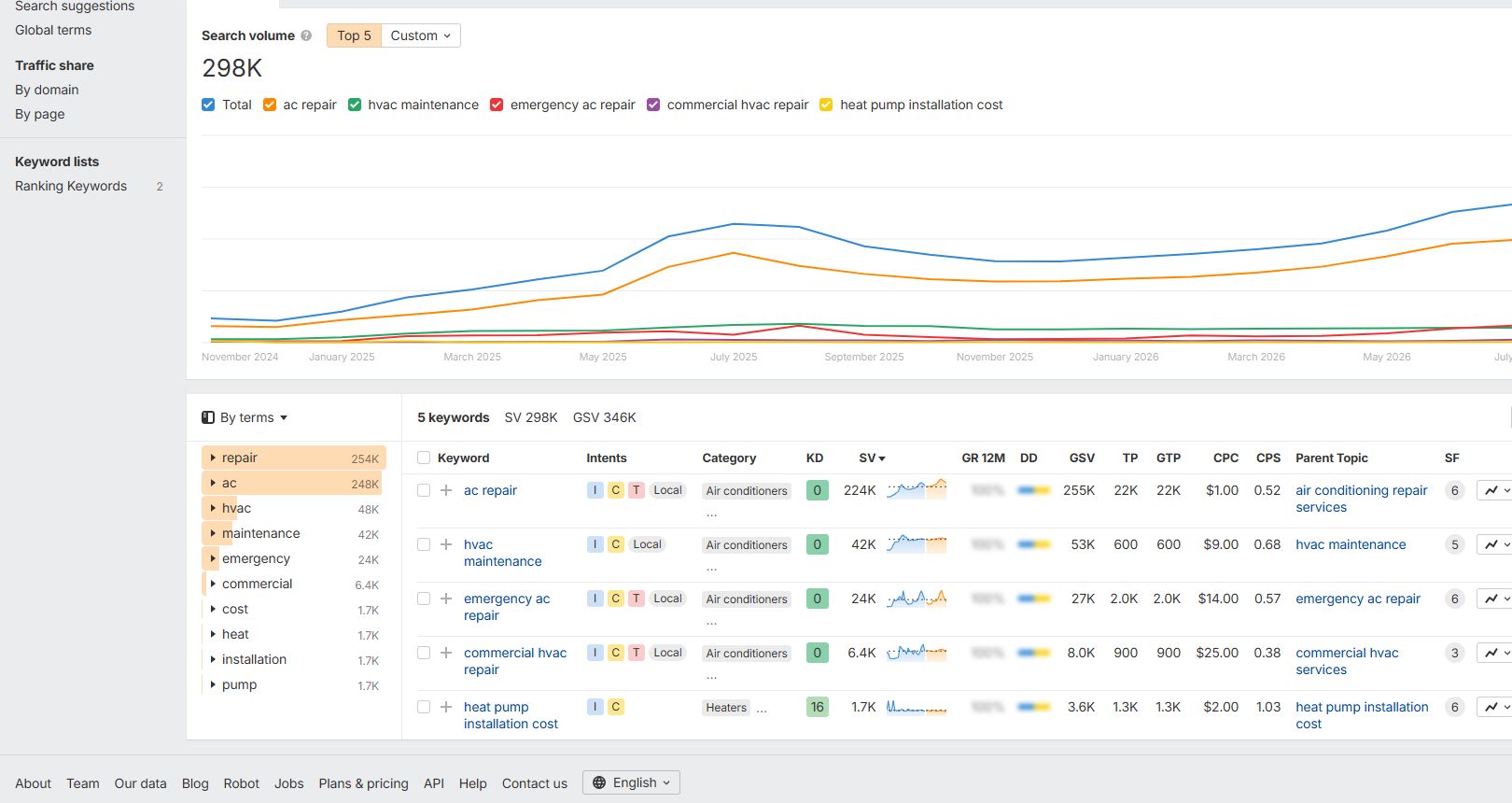
Ahrefs search volumes are estimates for the selected country. The contractor records the location and research date beside each metric and checks local search results before assigning a service-area page. Google's SEO Starter Guide places the customer's information needs at the center of page content.
2. Manage the Google Business Profile
Managing the Google Business Profile keeps the HVAC company’s identity, service area and contact information accurate on Search and Maps. Google's “Guidelines for representing your business on Google” requires consistent business identity, accurate service-area details and categories that describe the business.
The profile record contains the details used in local discovery.
- Name matches the business's established branding.
- Category describes the core HVAC service.
- Territory identifies the area served.
- Hours identify customer-facing availability.
- Phone connects callers with the business.
- Website opens the relevant business page.
- Photos document the team, equipment and work.
Under Google's service-area guidance, a business serving customers at their locations hides its address when it does not serve customers at that address. Profile ownership remains with the contractor. Staff changes include a review of account access, hours and service coverage.
3. Build HVAC service and location pages
Building HVAC service and location pages explains the work offered and how the contractor serves each named territory. A location page adds information about service delivery in a named territory.
Google's “Spam policies for Google web search” identifies doorway abuse as pages created for similar searches that funnel visitors to a less useful destination. A location page includes location-specific service information, completed-project context and contact details.
The service-page layout below follows the customer decision from the named service through scope, evidence, questions and contact action.
Service scope, equipment covered and appointment process.
Assessment, authorization and work performed.
Project photos and documented qualifications.
A repair page identifies the system types serviced and the diagnostic process. An installation page identifies assessment, equipment selection, estimate approval and installation scope. A maintenance page identifies tasks, equipment limits and appointment arrangements. Internal navigation connects these services with the relevant territory pages.
4. Write page titles, headings and answers
Writing page titles, headings and answers names the HVAC page’s purpose and organizes its response to the customer’s query. Headings organize the service answer into scope, process, evidence and customer questions.
Google's “Influencing your title links in search results” recommends concise, descriptive titles. It sets no fixed character limit and explains that displayed titles are truncated to fit device width. A service-title pattern is “AC Repair in [Service Area] | [Business Name].” The published title uses the contractor's actual location and name.
The first paragraph defines the service and identifies the customer need. Supporting sections cover equipment, appointment expectations and the estimate or authorization process. Image descriptions identify the subject shown. Credentials, customer statements and savings claims retain their supporting records.
Each page has one primary purpose. Its title, H1, opening answer and main sections describe that same purpose. The meta description summarizes the service and contact path.
5. Improve crawlability, speed and mobile usability
Improving crawlability, speed and mobile usability helps search engines access HVAC pages and customers use them on their devices. Google's Search Console documentation identifies crawling, indexing and search-traffic reports as tools for monitoring a site's search presence.
| Check | Evidence | Correction |
|---|---|---|
| Indexing | Search Console URL Inspection | Resolve unintended noindex or blocked access |
| Preferred URL | Canonical and redirect checks | Align duplicate URLs with the intended page |
| Navigation | Links from service hubs and menus | Connect important service pages |
| Broken destinations | Page response and link check | Repair missing service and contact pages |
| Mobile controls | Phone-width form and call-button test | Fix labels, spacing and submission errors |
| Images | File size and display dimensions | Compress files and reserve their display space |
Google's web.dev Web Vitals documentation defines good thresholds as LCP of 2.5 seconds or less, INP of 200 milliseconds or less and CLS of 0.1 or less. These thresholds apply at the 75th percentile of page visits. Google's “About PageSpeed Insights” explains its use of field and lab performance data.
Google's structured-data guidelines require markup to represent the page's visible content. Business details, service information and review data match the information displayed to visitors.
6. Earn reviews and local mentions
Earning reviews and local mentions builds a record of HVAC customer experiences and the company’s presence in its service area. Reviews record service experiences, while local mentions identify the company through organizations, suppliers and community relationships.
Google's “Tips to get more reviews” prohibits incentives for posting, changing or removing reviews. Its Maps contribution policy prohibits selective solicitation of positive reviews. A neutral request process follows completed service and uses the same review opportunity across customers.
A local citation identifies the business by name and contact details. A backlink connects another website to the contractor's website. Free profiles on Google Business Profile, Bing Places, Yelp and Nextdoor provide places to publish business information and a website address, subject to each platform's eligibility and verification process.
The contractor searches for an existing listing before creating one, uses the established business name and selects the correct HVAC category. The website field points to the relevant business page. Published links follow each platform's rules for redirects, indexing and link attributes. Listing approval and ranking credit are not guaranteed.
Existing supplier or manufacturer relationships provide another route to an accurate dealer listing. The contractor asks whether its current relationship includes a directory entry. A local publisher that already mentions the company provides an opportunity to request a website link. Paid association memberships and sponsorships remain separate budget decisions.
Google's spam policies identify links created primarily to manipulate rankings as link spam. The review process assigns an employee to responses and service follow-up, with customer personal details kept out of public responses.
7. Measure HVAC leads and page results
Measuring HVAC leads and page results connects search visibility with inquiries, booked jobs and completed work. Google's “About Search Console” describes reporting for impressions, queries and clicks.
| Measure | Record | Business question |
|---|---|---|
| Search impressions and clicks | Search Console | Which services and queries attract visibility? |
| Contact actions | Configured website analytics | Which pages produce calls or forms? |
| Qualified inquiries | Office lead records | Which contacts match service and territory? |
| Approved estimates | Estimate records | Which qualified inquiries approve work? |
| Completed jobs | Job and invoice records | Which approved jobs produce collected revenue? |
Monthly comparisons account for weather, service mix and the dates of significant website changes. A page-change log records the URL, revision and intended improvement. Inquiry records identify the reported source and prevent duplicate job counts.
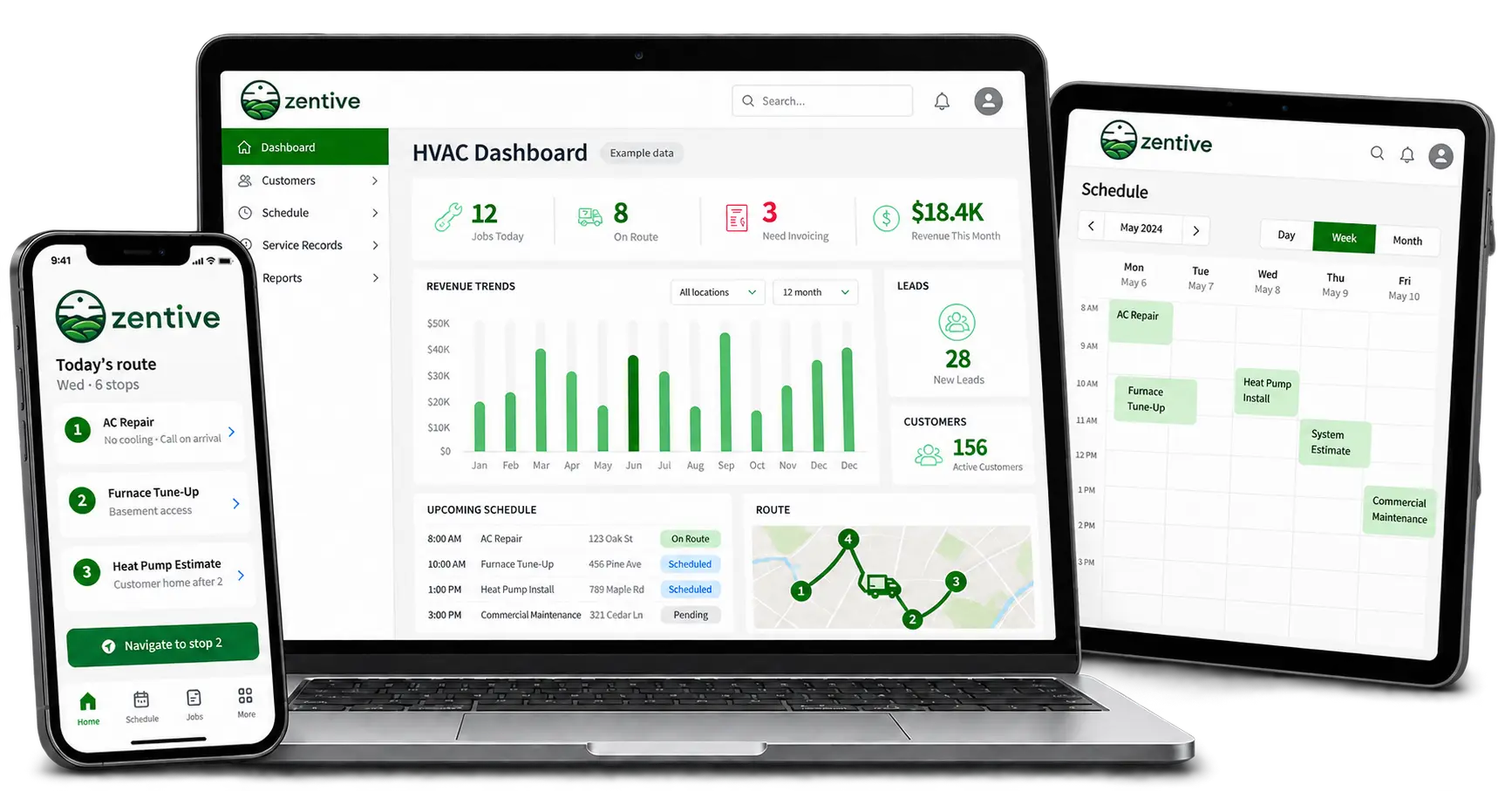
HVAC business software organizes customer details, estimates, schedules and invoices after the inquiry. Zentive's HVAC business software supports that operating record. The device image below shows the dashboard, tablet service schedule and phone route used to organize work.
What else affects HVAC SEO?
HVAC SEO requires time, expertise and measurement. Paid advertising remains a separate acquisition channel.
What HVAC SEO mistakes need fixing?
HVAC SEO mistakes include inaccurate profiles, duplicated pages and barriers to discovery. Google's business-profile guidelines and Search spam policies provide the basis for these corrections.
| Mistake | Simple correction |
|---|---|
| Copied city pages | Add actual local service details and project evidence. Consolidate pages that serve the same purpose. |
| Keywords added to the business name | Use the established real-world business name. |
| Orphan service pages | Add a relevant link from a service hub or location page. |
| Unintended indexing blocks | Check URL Inspection and remove accidental access or noindex restrictions. |
| Bought ranking links | Stop purchasing links intended to manipulate rankings. Earn relevant mentions through real business relationships. |
Should an HVAC contractor hire an SEO agency?
Yes. Agency support fits when internal time or expertise is insufficient. Google recommends checking agency experience, methods and reporting within the HVAC marketing plan. The HVAC marketing strategy guide organizes the acquisition plan.
Can HVAC ads run while SEO develops?
Yes. HVAC ads buy campaign exposure while SEO develops organic discovery. The HVAC ad examples guide provides campaign examples.
How long does HVAC SEO take to work?
Google’s SEO Starter Guide describes a few hours to several months for changes to appear in Search. It recommends waiting a few weeks before assessing effects.
How does HVAC software support customers acquired through SEO?
HVAC software organizes the customer workflow after a search inquiry. Zentive supports the estimates, schedules and invoices established when starting an HVAC business. The HVAC business setup guide covers the launch requirements.